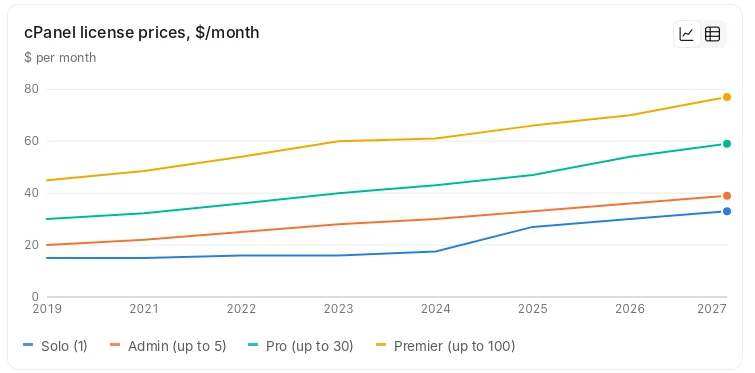
The increase continues a long upward trend: since 2019, the base Solo license has more than doubled in price. Below, we break down what changes on December 16 and which alternative offers better value.
The new prices apply to all new orders and renewals. This is confirmed by the vendor itself on its FAQ page and in the official 2027 price list sent to customers.
Monthly license price changes effective December 16, 2026
Plan | Accounts | Prices before December 16, 2026 | New price from December 16, 2026 | Difference |
| Solo | 1 | $29.99 | $32.99 | +10.0% |
| Admin | Up to 5 | $35.99 | $38.99 | +8.3% |
| Pro | Up to 30 | $53.99 | $58.99 | +9.3% |
| Premier | Up to 100 | $69.99 | $76.99 | +10.0% |
| Bulk Account | Each additional account on the Premier plan | $0.49 | $0.55 | +12.2% |
Seven Years of Continuous Price Increases
After the vendor was acquired by investment company Oakley Capital, it abandoned its fixed per-server pricing model in favor of charging for each account. This led to a sharp increase in costs for users and hosting providers with large numbers of customers on a single server. The company switched to per-account pricing, and prices have been rising almost every year ever since.
Why Rising License Prices Are a Problem for Control Panel Users and Hosting Providers
Unpredictable Budgeting
The license price goes up every December. Each time, hosting providers have to choose between raising prices for their customers or accepting lower profit margins. The 2027 prices were announced in early October and will take effect as soon as December 16, 2026. Two months is not enough time to recalculate pricing plans and notify customers.
Per-Account Pricing Makes Growth More Difficult
The more customers a server hosts, the higher the bill. The cost increases most rapidly for each additional account exceeding the 100-account limit.
New Prices Also Apply to Existing Licenses
Renewal prices will also increase on December 16, meaning hosting providers cannot keep the old price for servers that are already running.
Many users and hosting providers are accustomed to the interface, and hosting providers have billing systems, automation scripts, documentation, and support staff training tied to the control panel. Migrating to another control panel requires transferring websites, email, and databases. Knowing that customers are reluctant to migrate, the vendor may continue raising prices. However, switching to another control panel is entirely possible. Migration will allow you to take control of your license costs.
ispmanager: an Alternative with Predictable Pricing
ispmanager is a hosting control panel with predictable pricing and high reliability. It provides all the essential tools hosting providers rely on, without per-account fees.
Benefits of the ispmanager Control Panel
Reliability
ispmanager has been in development for 20 years and runs on servers in 150 countries. Hosting providers across Europe offer it to their customers — see the list of ispmanager partners.
Transparent pricing not tied to the number of users
The license starts at €6.49 per month per server (excluding VAT), and ispmanager licenses can be paid in euros. When paying annually, one month is free. ispmanager offers three plans depending on the number of domains and additional features. The number of users is unlimited and does not affect the price. Hosting companies can benefit from a partner program offering discounts of up to 60% on licenses.
Lite For personal and small projects Up to 10 websites
| Pro For professionals and businesses Up to 50 websites + Docker
| Host For hosting service providers Unlimited websites, all features
|
| €6.49 / month | €12.99 / month | €22.99 / month |
Try ispmanager free for 14 days
Your familiar tools are still available
You will find familiar tools in ispmanager:
- Integration with any billing systems via API or ready-made modules.
- Flexible access control: access to websites and control panel settings can be restricted for user groups.
- The ispmanager Resource Limiting module restricts user resources and file systems. It does not require installing a separate operating system — it runs on AlmaLinux 9 and 10.
- File manager.
- FTP and CRON scheduler.
- Email with a web interface, forwarding, autoresponders, and filters.
- MySQL, MariaDB, Percona, and PostgreSQL databases are supported and can be managed through phpMyAdmin.
- Let's Encrypt certificates are issued and renewed automatically.
- Separate PHP version for each website.
- Backups are created on a schedule and can be stored on a remote server.
- WordPress Toolkit for WordPress.
- Any popular CMS can be installed with one click through Softaculous.
ispmanager is constantly evolving
Updates with new features, improvements, and fixes are released every two weeks. Many new features were introduced in 2026 alone. Here are just a few examples:
- Resource Limiting module for managing user resource allocation
- AI website builder
- Git integration
- Reverse proxy for websites
- Improved Node.js support
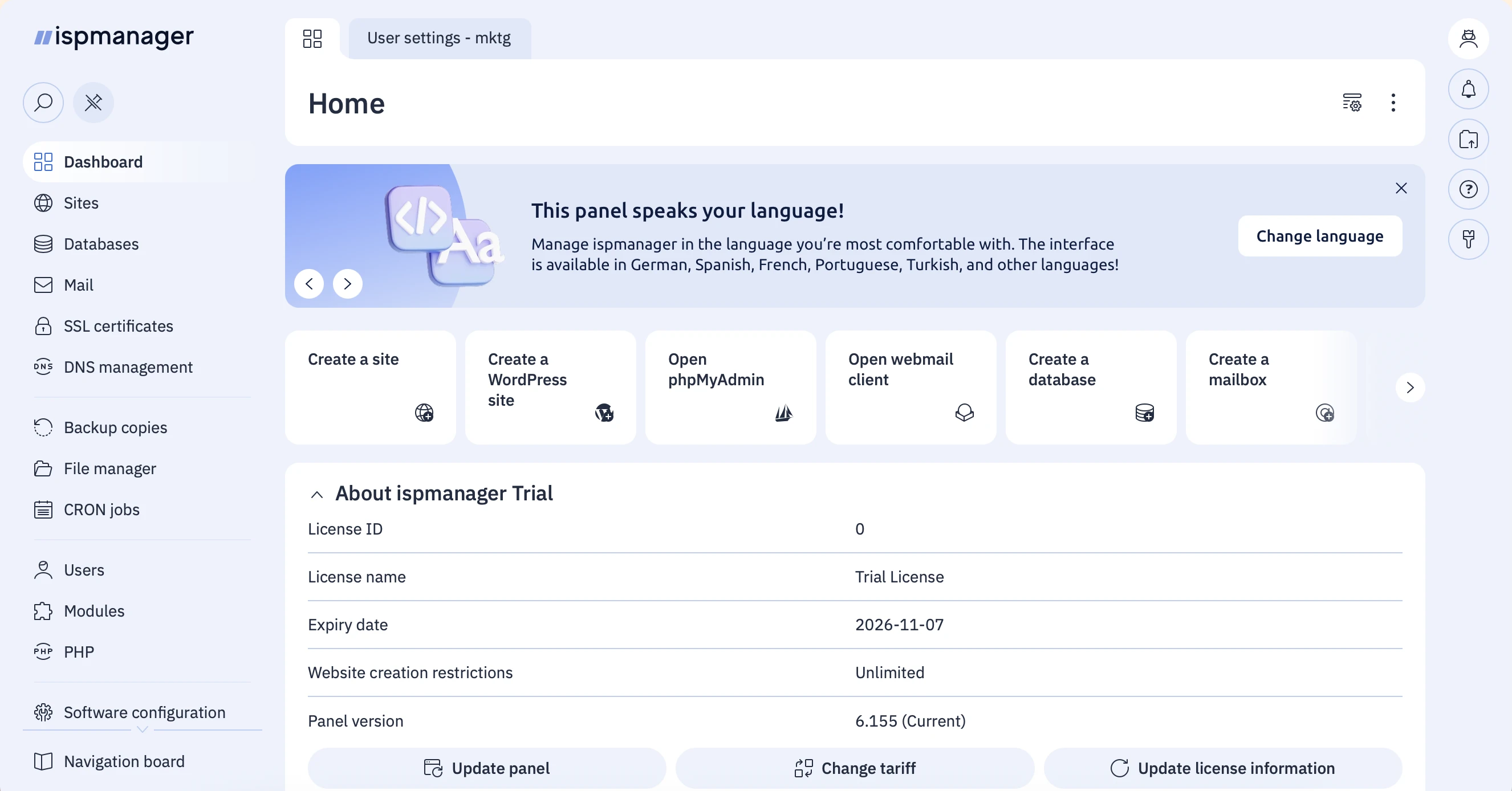
A clean, modern interface
Convenient for hosting providers and control panel users.
Smooth and Fast Migration to ispmanager
Import Wizard
ispmanager includes a built-in import tool: simply specify a cPanel backup or start the migration using rsync. The control panel will automatically transfer users, websites, domains and DNS records, email accounts and messages, MySQL databases, SSL certificates, CRON jobs, and FTP access credentials.
Even before starting, you will know what will be transferred and how: the import wizard checks the new server, installs any missing software if necessary, and generates a report. During the migration, the log shows the current migration stage for each website and mailbox.
Order data transfer from cPanel
Full Support from the ispmanager Technical Support Team
If you don't want to handle the migration yourself, ispmanager specialists will transfer your data for you. Email us at help@ispmanager.com and tell us about your requirements — we will discuss the timeline and cost.