Changing your TLS version
For existing sites
Via the control panel
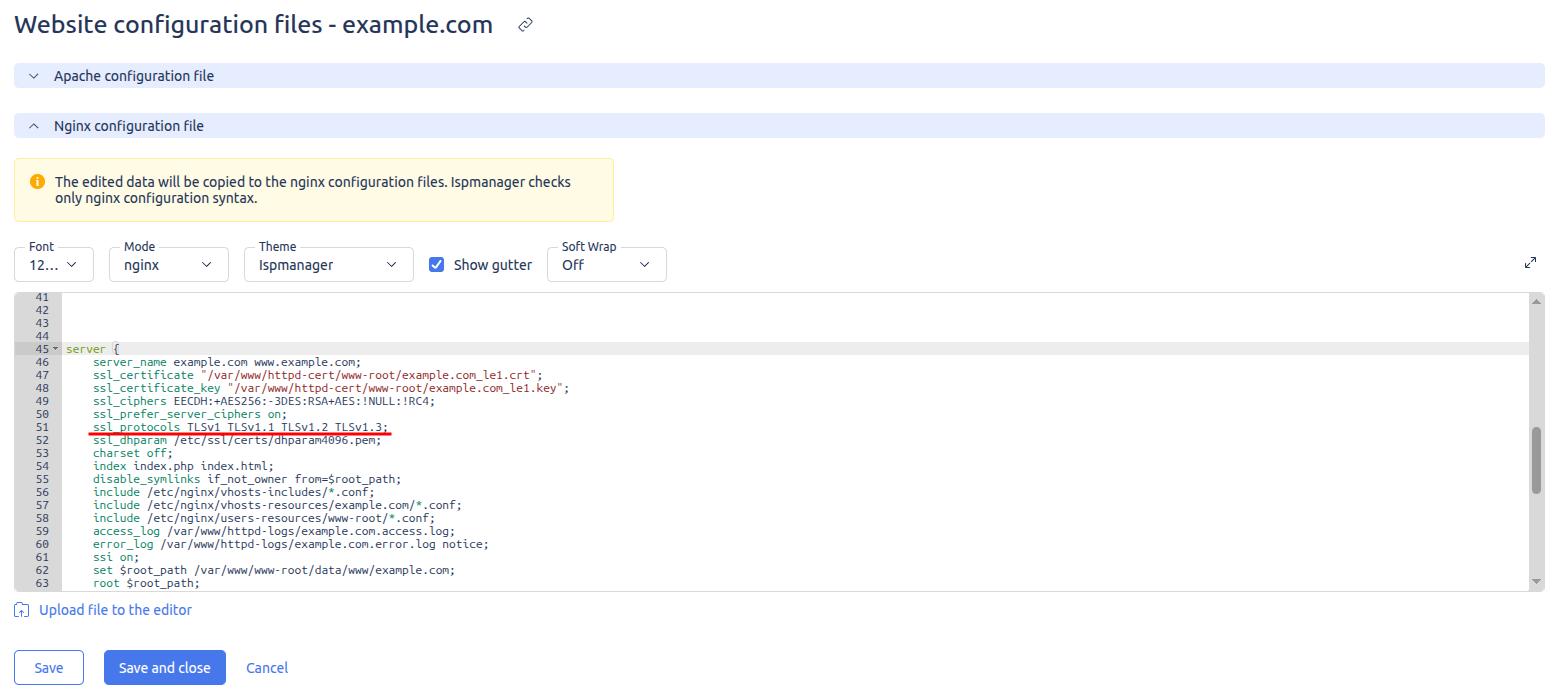
To change the supported TLS versions for an existing site through the panel, follow these steps:
- Go to the «Sites» section.
- Select the desired site and click on the «Configuration Files» button.
- In the form that opens, find the «Nginx» section of the configuration file, and in the
serversection, enter the necessary TLS versions in thessl_protocolsbox.
Via the terminal
To change the supported TLS versions for an existing site through the terminal, you must edit the site configuration file.
For a site on Nginx:
/etc/nginx/vhosts/USERNAME/SITE_NAME.conf
For Apache-based sites:
RHEL-based:
/etc/httpd/conf/vhosts/USERNAME/SITE_NAME.conf
Debian-based:
/etc/apache2/vhosts/USERNAME/SITE_NAME.conf
In the relevant configuration file, find the ssl_protocols parameter and specify the relevant TLS versions, for example:
ssl_protocols TLSv1.2 TLSv1.3;
After making these changes, restart the corresponding web server.
For a site on Nginx:
service nginx restart
For Apache-based sites:
RHEL-based:
service httpd restart
Debian-based:
service apache2 restart
For new sites
To create sites with an up-to-date version of TLS, add the appropriate SSLSecureProtocols parameter to the panel configuration file via the server terminal.
For example, for TLSv1.2 and TLSv1.3 sites (on OS with OpenSSL version 1.1.1 or higher), add the following line to /usr/local/mgr5/etc/ispmgr.conf:
SSLSecureProtocols TLSv1.2 TLSv1.3
After making these changes, restart the panel:
/usr/local/mgr5/sbin/mgrctl -m ispmgr -R