Reselling ispmanager licenses via API
Automating the resale of ispmanager licenses via API allows for flexible sales and customer service management, as well as adapting the process to your needs and business strategy.
Resale mechanics
- License selection and order. When accessing the partner's billing account, end customers see the prices for the licenses set by the partner. They select the desired license and click the Buy button.
- License order in the ispmanager client area. The partner then processes the end customer's order and purchases the license in the ispmanager personal account. This can be automated via the API or purchased manually.
- Updating license information in partner billing. After the order is successfully processed, the partner billing system receives information about the purchased license. This ensures the correct activation and use of the license by the end customer.
- License activation and management. The end customer activates the license on the server and manages it through their personal account in the partner billing system.
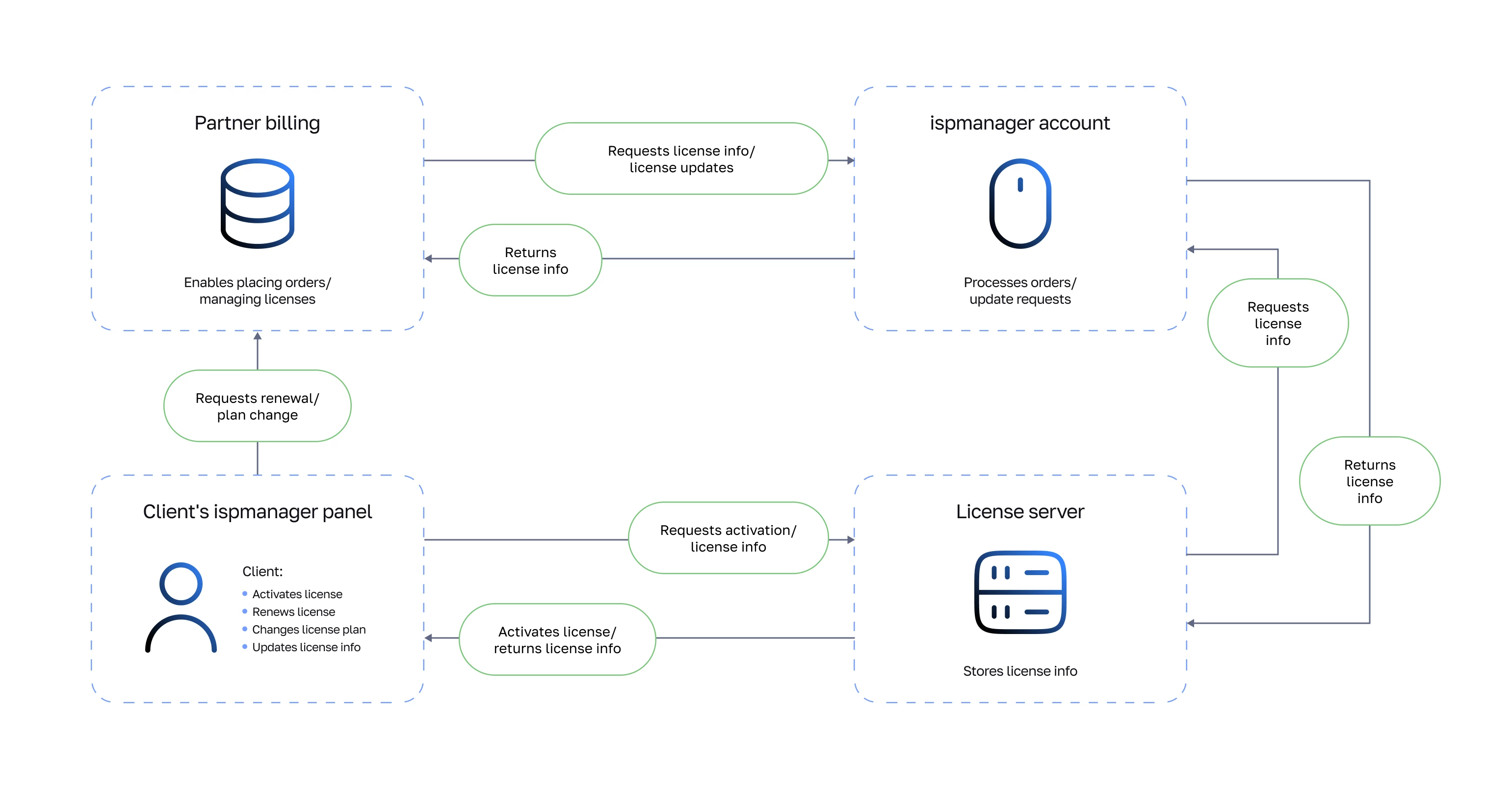
Step 1. Configuring partner billing
To allow customers to renew their ispmanager license and change its plan from the control panel, implement GET requests for license renewals and plan changes in your partner billing.
Example of a license renewal request:
https://api.PARTNER_BILLING.com/?action=prolong&query=startform%3Dservice.prolong%26utm_source%3Dispmanager_panel%26elid%3D8898549%26utm%5Fsource%3Dispmanager%5Fpanel&license=8898549&ip=37%2E230%2E114%2E96&utm_source=ispmanager_panel- action — the type of action called: prolong — renewal
- license — license ID
- ip — primary IP address on the server running ispmanager
Example of a request to change the license plan:
https://api.PARTNER_BILLING.com/?action=changepricelist&query=startform%3Dservice%2Echangepricelist%2Egetmoney%26pricelist%3D55231%26elid%3D8898549%26utm%5Fsource%3Dispmanager%5Fpanel&license=8898549&ip=37%2E230%2E114%2E96&utm_source=ispmanager_panel&pricelist=IM6L- action — the type of action called: changepricelist — change plan
- pricelist — new plan ID
- ip — primary IP address on the server running ispmanager
Step 2. Order processing
Below are the automated ordering and license management features in the ispmanager partner account via API.
All functions support GET and POST requests.
All requests are processed using your real data in your real account. Therefore, if you complete an order with the skipbasket=on parameter, the order will be completed immediately, and funds will be debited from your account balance.
To complete the request, select the API address of your ispmanager account through which the resale will be processed:
Step 3. Updating license information
Information about your license and purchased modules is updated automatically once per day. To update license information immediately, update the data manually in the License management section of the ispmanager panel: