CloudLinux limits
CloudLinux allows you to limit user resource usage. It is achieved through LVE and MySQL Governor technologies. LVE can operate both in conjunction with and independently of MySQL Governor.
When used separately, LVE sets server resource limits for all user tasks.
When LVE is used in conjunction with MySQL Governor, database-level limits are applied. MySQL Governor monitors the database server load during set periods of time. If the load persists, MySQL Governor contacts LVE to reduce user process activity to the set limits.
A user is uploading a database backup to ispmanager. To prevent crashes in other users' processes and maintain sufficient database server performance, the administrator is limiting resources using MySQL Governor. The user's task is given a lower priority, takes longer to complete, but completes successfully. Other users' processes are not getting blocked or slowed down.
All limits are specified in the CloudLinux section.
Limits configuration is available for administrator-level accounts or above.
LVE limits
LVE limits apply only to Apache processes when executing PHP or CGI scripts. Dovecot/Exim processes are not subject to limits.
LVE limits will be applied to users if they don't have CloudLinux limits set for them from the user's settings.
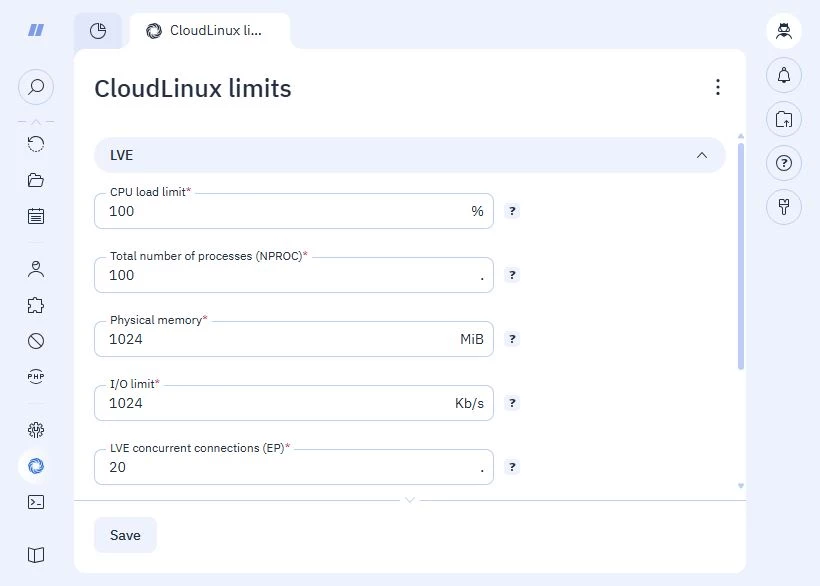
- CPU load limit — the user process limit threshold. Values are expressed as a percentage (%). For example, 100% corresponds to one core being fully loaded.
- Total number of processes (NPROC) — the user process threshold. The value is expressed in units.
- Physical memory — the maximum amount of physical memory that can be allocated to processes of a user. The value is expressed in MB, includes shared memory and disk cache.
- I/O limit — the maximum data throughput for reading and writing data from the disk. The value is expressed in KB/second.
- LVE concurrent connections (EP) — the maximum number of LVE user processes. The value is expressed in units.
To monitor the load, go to the Server resources section.
CloudLinux recommendations for LVE limits
| Regular hosting | High-end hosting | |
|---|---|---|
| CPU load limit | 100% | 200% |
| Physical memory | 512 MB | 1 GB |
| I/O limit | 1024 KB/s | 4096 KB/s |
| LVE concurrent connections | 20 | 40 |
| Total number of processes | 100 | 100 |
LVE configuration files
Limits are specified in the configuration file at /etc/container/ve.cfg.
Limit parameters:
<cpu limit="VALUE"/>— controls the maximum CPU load<nproc limit="VALUE"/>— controls the total number of processes<io limit="VALUE"/>— controls the maximum disk access speed<mem limit="VALUE"/>— controls the physical memory threshold<other maxentryprocs="VALUE"/>— controls the threshold for the number of concurrent LVE connections
MySQL Governor limits
Available in ispmanger pro and ispmanager host.
You can limit resource consumption for different time periods:
- 1 second
- 15 seconds
- 1 minute
- 5 minutes
We recommend setting up restrictions so that the user can consume more resources for a short time but cannot do this continuously for a long time.
To use limits, Enable MySQL Governor and set the following parameters:
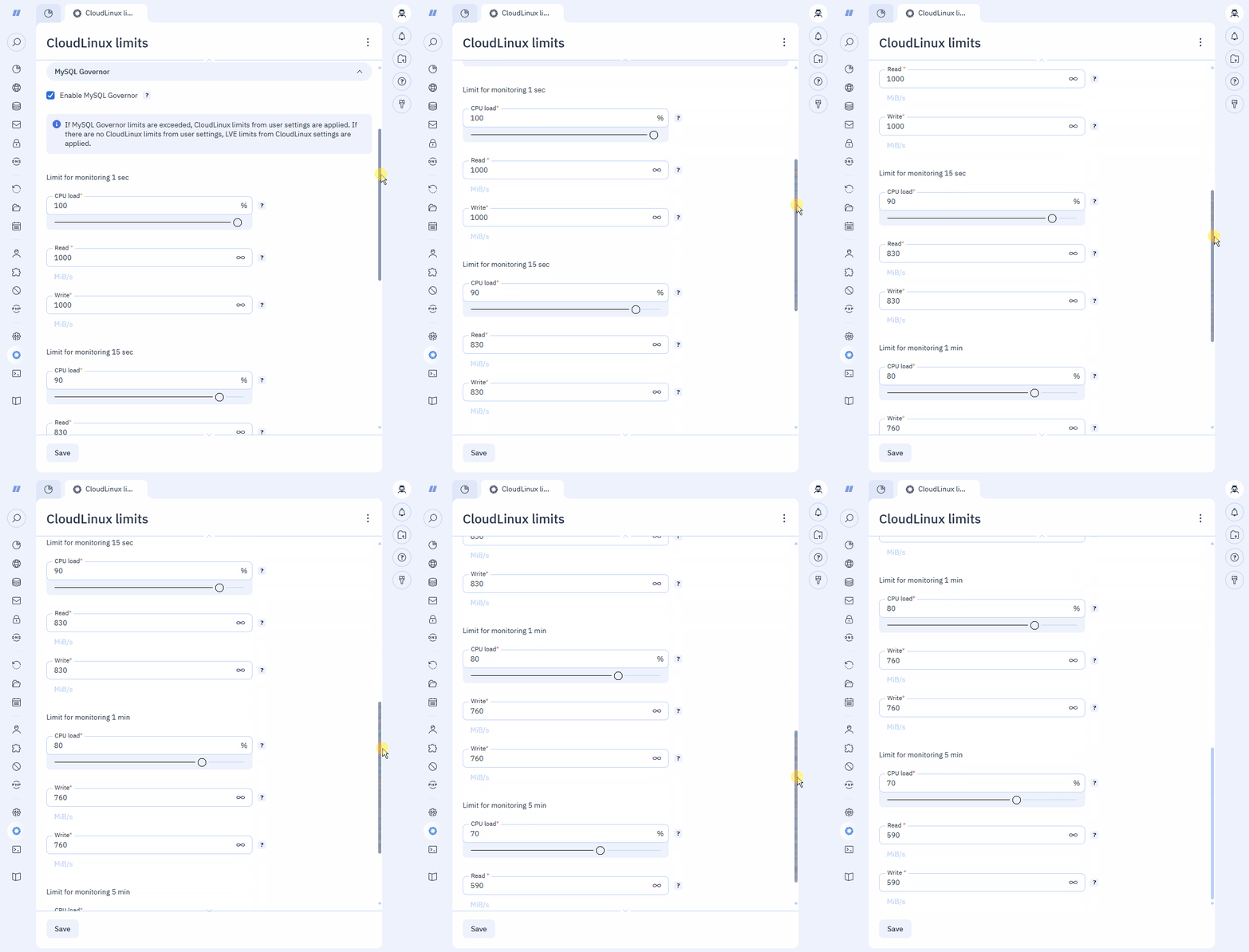
CPU load — the processor load threshold. The value is expressed as a percentage (%).
Example100% means all cores being fully loaded, 50% means half of the cores being fully loaded, 25% means 25% of the cores being fully loaded, etc.
- Read — the threshold for the amount of data read from the disk over a specified period of time. The value is expressed in MB/second. Cached data is not included.
- Write — the threshold for the amount of data written to the disk. The value is expressed in MB/second.
To set unlimited mode, click on the  in the fields.
To monitor the load on MySQL, use the dbtop utility in the shell or in the console after connecting to the server via SSH.
If a user exceeds MySQL Governor thresholds, LVE limits will be applied to the user queries.
MySQL Governor configuration files
Limits are specified in the configuration file at /etc/container/mysql-governor.xml.
Time period parameters:
- current — corresponds to a 1-second value
- short — corresponds to a 15-second value
- mid — corresponds to a 1-minute value
- long — corresponds to a 5-minute value
Limit parameters:
<limit name="cpu" current="VALUE" short="VALUE" mid="VALUE" long="VALUE" />— CPU load limit for time periods<limit name="read" current="VALUE" short="VALUE" mid="VALUE" long="VALUE" />— disk read limit for time periods<limit name="write" current="VALUE" short="VALUE" mid="VALUE" long="VALUE" />— disk write limit for time periods
MySQL Governor logging
Information on program operation is written to the following files:
/var/log/dbgovernor-error.log— error log for establishing a connection between MySQL Governor and the MySQL database server/var/log/dbgovernor-mysqld.log— MySQL Governor connection log for the MySQL database server/var/log/dbgovernor-restrict.log— load block monitoring log for the MySQL database server