Main SSL certificate for Exim
The SSL certificate is necessary for Exim to establish secure SMTP connection. With it, the sending and receiving mail servers negotiate a session key used to encrypt the transmitted data. Only the connection participants can decrypt the key.
Technically, mail will work with any Exim certificate. However, if the sending domain matches the server's IP address, anti-spam filters on recipient mail servers are less likely to block your messages.
In ispmanager, you can configure SSL certificates separately for the Exim mail server and separately for mail domains. This article describes how to configure the certificate for Exim.
Default Exim certificate
When installing the panel with minimal software, Exim and its certificate are not automatically installed.
When you install the panel or the Exim mail server, ispmanager generates a self-signed certificate. The Common Name field is set to the server's hostname, e.g. server.example.com. The connection is encrypted without any additional configuration, but such a certificate does not verify the server's identity: the name in the certificate may not match the domain from which messages are actually sent. As a result, messages sent with such a certificate may be blocked by anti-spam filters.
To reduce the risk of messages being blocked by anti-spam filters, replace the self-signed certificate with a valid one. You can use a free Let's Encrypt certificate, which ispmanager can issue and renew automatically, or a paid certificate from another certificate authority.
When using IMAP, if the connection addresses do not match the mail server certificate alias, the default certificate will be used instead of the specified mail server certificate.
Preparing for Exim certificate installation
Before installing an SSL certificate for the mail server, make sure that the following requirements are met:
- the Exim mail server is installed
- a user that will own the certificate is created in the panel
- the domain that will be used in the certificate is registered and accessible over the internet
- А- or AAAA record of the certificate domain points to the IP address of the ispmanager server
Adding Exim certificate
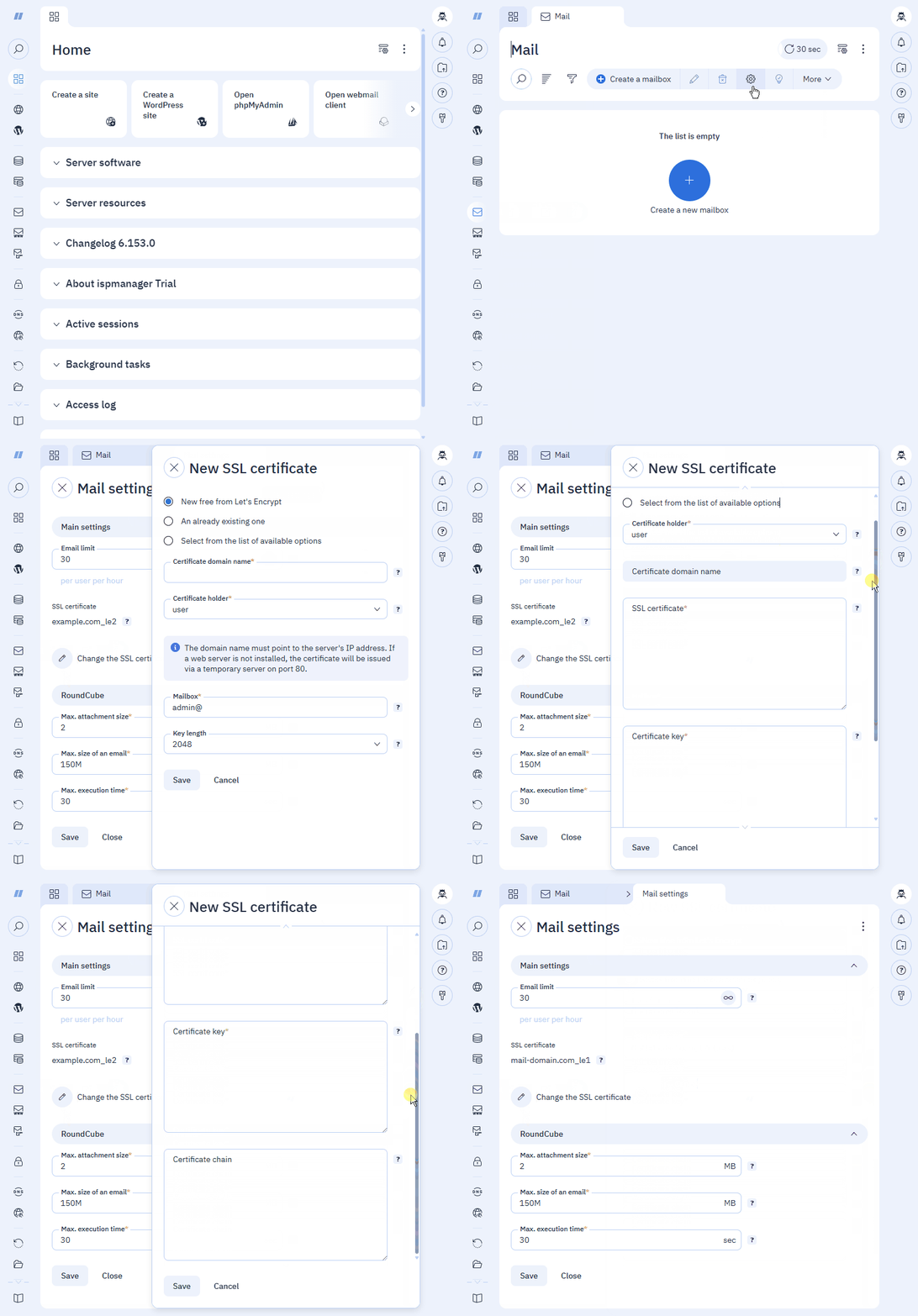
- Log in to the ispmanager panel with an administrator-level account or above.
- Go to the Mail section.
- On the toolbar, click
 Mail settings.
 - Click Change the SSL certificate to replace the current certificate with a different one.
Select the certificate option and fill in the parameter fields.
The Let's Encrypt certificate will renew automatically every 90 days via ispmanager.
This option does not support the DNS validation and Wildcard certificates. If you need those, issue an SSL certificate manually in the SSL certificates section and install it on the server using the option Select from the list of available options.
- Certificate domain name — the domain, which matches the server's hostname
- Certificate holder — the user account that will be used used to generate the certificate
- Mailbox — email of the certificate holder
- Key length — 2048 (default) or 4096 bit
Use this option to add a certificate from another external issuer.
- Certificate holder — the user account that will be used used to generate the certificate
- SSL certificate — the certificate in the PEM format (.crt)
- Certificate key — the certificate key in the PEM format (.key)
- Certificate bundle — the certificate bundle in the PEM format (.ca-bundle)
Use this option to select an existing SSL certificate from the panel.
- Domain name — the domain, which matches the server's hostname
- SSL-certificate — the name of the certificate
- Click Save.
After the changes are saved, the new Exim certificate will automatically apply to all mail domains.
The Exim certificate is marked with the  icon and appears in the list in the SSL certificates section.
Deleting Exim certificate
The Exim SSL certificate can not be missing.
If you remove the current certificate from the list of SSL certificates or the user that owns it, ispmanager will replace it with the default self-signed certificate. Emails will again be rejected by the anti-spam systems of receiving servers more often.
If the site that uses the same certificate is deleted, the certificate will continue working and renewing for mail.
Exim certificate files
| RHEL based systems | Debian based systems | |
| Exim certificate | /etc/exim/ssl/exim.crt | /etc/exim4/ssl/exim.crt |
| Exim certificate key | /etc/exim/ssl/exim.key | /etc/exim4/ssl/exim.key |