Temporary domains
A temporary domain is a fourth-level domain within the ispmanager.name zone. It allows users to access any site created in ispmanager via a browser without purchasing a domain or performing additional configuration.
It is applicable for testing or quickly launching a new site using the AI website builder.
How a temporary domain works
Temporary domain creation is implemented via an asynchronous workflow: ispmanager → external service → Let's Encrypt → ispmanager.
- ispmanager handles site and domain form events, maintains a database, manages scheduled tasks and user issues, communicates with the external service, and executes long-running operations such as record creation/deletion and synchronization.
- In addition to managing DNS, the external service verifies IP address ownership and limits the number of temporary domains issued per server.
- Let's Encrypt acts as the certificate authority and issues an SSL certificate for the temporary domain.
Name format
A temporary domain follows the format <random_characters>.<site_ip_address>.ispmanager.name. For example: a1b2c3d4e5.192-0-2-10.ispmanager.name.
Nginx proxying
The temporary domain does not appear in the site's files and functions solely through proxying. When the option is enabled, a proxy configuration section is added to the site's Nginx configuration file. Once the temporary domain is disabled, this proxy section is removed.
After testing the site, there is no need to change the domain name in the site's configuration files or CMS settings; simply disabling the temporary domain is sufficient.
DNS
An A-record for the temporary domain is automatically configured on the ispmanager service side, matching the site's IP address as defined in its settings. No other DNS records are created; therefore, the temporary domain cannot be used for email or any purpose other than site testing.
If the site's IP address changes, the temporary domain is recreated with the new IP address.
SSL
A free Let's Encrypt SSL certificate is automatically issued for the temporary domain. While this certificate appears in the general list of certificates, it cannot be managed manually; renewal, reissue, and verification are handled automatically by ispmanager services.
The issued certificate is linked to the site as an additional SSL certificate; it does not replace the site's primary certificate but is used exclusively for the temporary domain section within the site's Nginx configuration file. The site's primary SSL certificate remains unchanged.
If an SSL certificate cannot be issued—for instance, if Let's Encrypt limits have been reached—no certificate is generated, and the temporary domain opens via HTTP.
It is also possible to issue an SSL certificate for a temporary domain, just as for a normal website.
Warning placeholder
A static placeholder page is displayed upon the first visit to the temporary domain. It includes:
- an explanation that this is a temporary domain
- an option to “Mark this domain as trusted and do not show this message for 90 days”
- a “Visit the website” button
When the “Visit the website” button is clicked, a trusted_temp_domain=Yes cookie is set in the browser; Nginx uses this cookie to proxy requests from the temporary domain to the actual site.
If the visitor selects the option “Mark this domain as trusted and do not show this message for 90 days,” the cookie remains valid for 90 days; otherwise, it lasts for only 1 day.
SEO
The temporary domain is not indexed by search engines.
Service life
There is no time limit on the service life of a temporary domain. It remains active until disabled by the user or administrator.
Requirements for using temporary domains
- ispmanager plan: lite, pro, or host
- At least one public IPv4 address is assigned to the site. IPv6 addresses are not supported.
- Nginx is installed in ispmanager.
- NAT is not used in ispmanager.
If any of these conditions are not met, the temporary domain checkbox on the site configuration form is hidden or disabled.
Enabling temporary domains
In new installations (version 6.152 and later), temporary domains are enabled for all users by default. They are also enabled when upgrading to version 6.152 or higher, unless technical domains have already been created; in that case, the use of temporary domains must be enabled manually.
- Log in to the ispmanager panel with an aministrator-level account or above.
- Go to the Policies section.
- Select or clear the Enable the use of ispmanager temporary domains checkbox.
Connecting a temporary domain for a site
Only one temporary domain can be connected per site.
Connect a temporary domain when creating or editing a site. To do this, check the Connect a temporary domain box and save the changes.
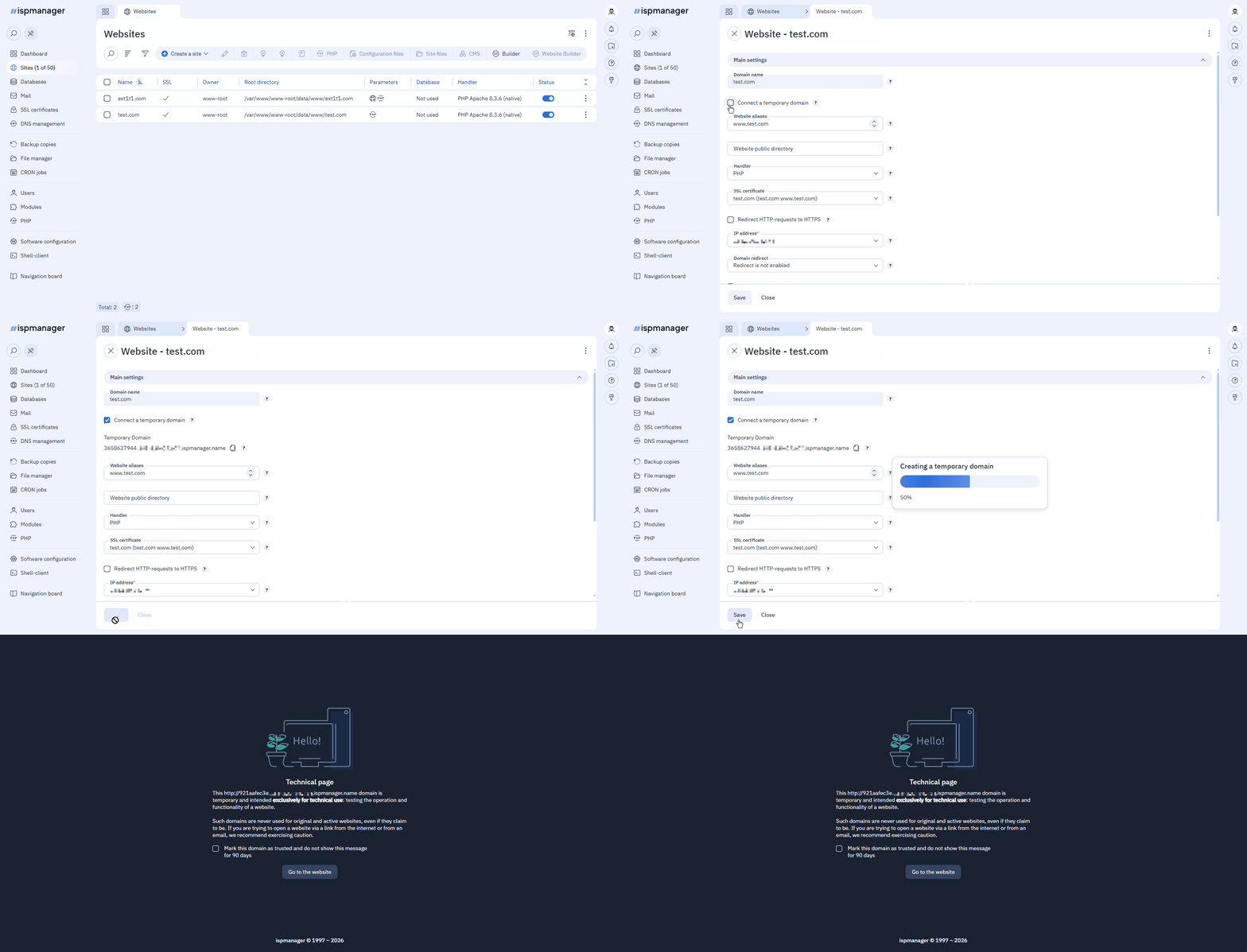
If an error occurs while connecting the temporary domain, ispmanager will create an issue with an auto-resolution option for the user.
Removing a temporary domain
Simply uncheck the Connect a temporary domain box when editing the site.
Logging
Temporary domain activity is recorded in a dedicated log file: /usr/local/mgr5/var/temporary_domain.log.