Site cloning
Ispmanager offers quick cloning of any website, allowing you to create a complete working copy in minutes. Cloning is convenient for testing changes, creating a staging environment, or launching a new version of a project without risking the main website.
Website cloning requirements
Before cloning a site, ensure that the future website owner is allowed to use the same handler (PHP, Python, or Node.js) as the original website.
Website cloning process
Ispmanager checks the settings of the future website owner and the specified domain before initiating cloning. If the settings don't meet the requirements or the domain is specified incorrectly, the process will fail and an error will be displayed. If all requirements are met, cloning will begin automatically.
The following entities will be cloned:
| Entities | Will be copied |
|---|---|
| Website settings | |
| Website PHP settings | |
| Website error pages | |
| Website redirects | |
| Site access restrictions | |
Webste files Details The original site's name will remain unchanged in the clone site's files. If necessary, change it manually. | |
Website database Details For the database of the clone site, ispmanager will create a new name and new authorization data, while the database contents will remain unchanged. You will need to manually replace the database connection data in the clone site's files. For WordPress sites, ispmanager will automatically replace the database connection data. | |
Website aliases that are subdomains Details When cloning the site example.com with the aliases one.example.com and test.com, the resulting clone will have an arbitrary name, for example, clone.com with the alias one.clone.com. The alias test.com will not be copied to avoid overlapping with the aliases of other sites. | |
| SSL certificate | |
Port Details If a port was assigned to the site, the clone site will be assigned the next free port. |
Creating a website clone
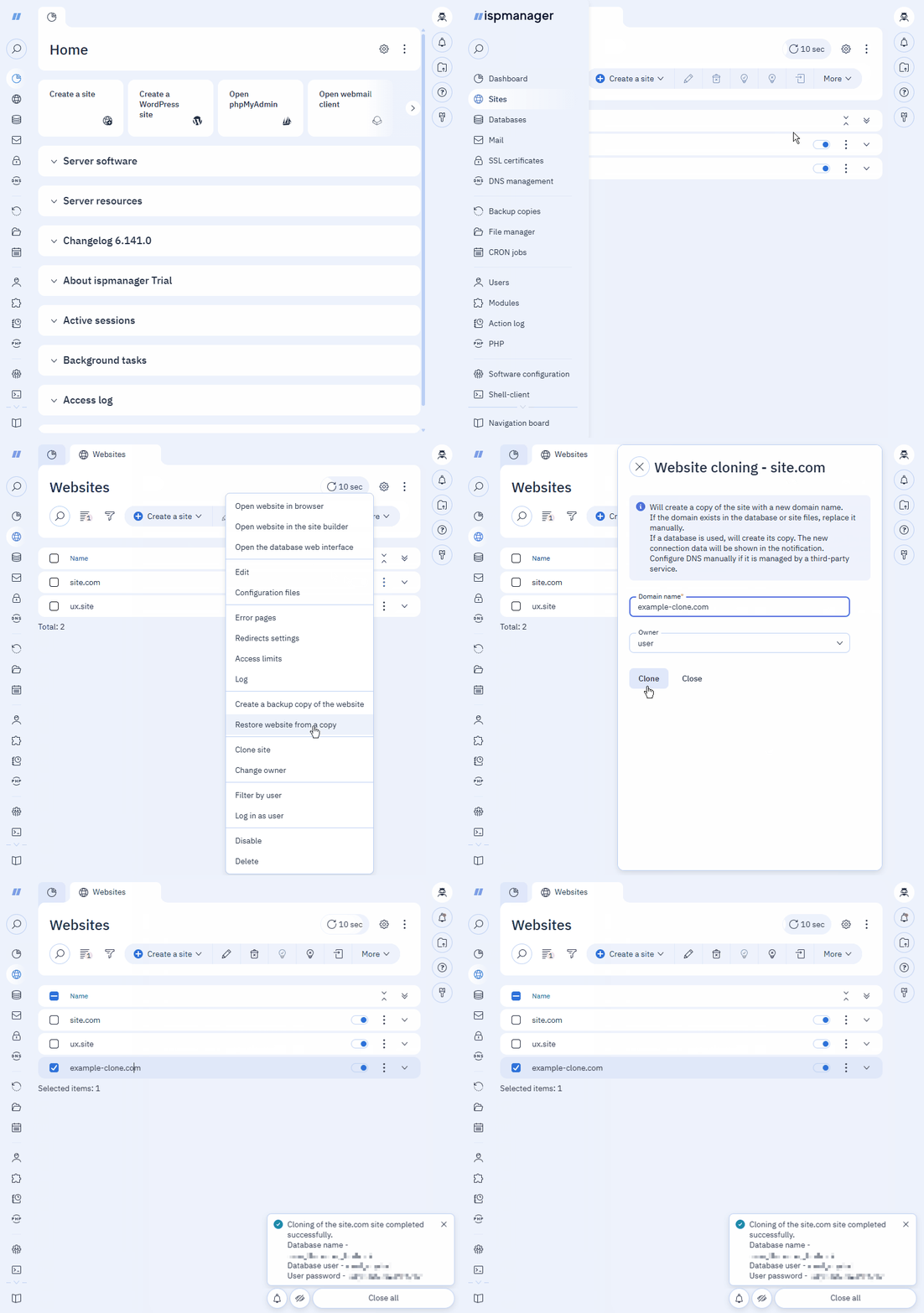
- Log in to your ispmanager account.
- Go to the Sites section.
- Select an existing site.
- Click
 .
. - In the context menu, click Clone site.
- Fill out the form:
- Domain name — a unique name for the site on the internet. The maximum allowed length: 255 characters.
- Owner — the user-owner the site. This field is not accessible to accounts of the user level.
- Click Clone.
The site cloning process will begin. If successful, a notification will appear stating " Cloning of SITE_NAME site completed successfully."
Cloning log
Cloning is recorded in the main log of the ispmanager panel: /usr/local/mgr5/var/ispmgr.log.
The log registers two events:
the start of cloning operation with an action
action 'SITE_CLONE'.Example of cloning operation startDec 18 07:55:31 [899205:527] action EXTINFO Get message for error in action 'example-clone.com' for level 30the cloning operation with the action
Clone site 'ORIGINAL_SITE' to 'SITE_CLONE'.Example of cloning operationDec 18 07:55:31 [899205:527] Clone site 'example.com' to 'example-clone.com' for level 30.
If necessary, a record of the following type appears: ERROR Error: Type: ERROR_CATEGORY Object: ENTITY.
Main error categories for Type:
dbms— failed to create or copy data resourcesskipped— object not found. For example, a domainvalue— invalid value. For example, the handler is unavailable to the clientcert_used— SSL certificate is busy or unavailableaccess— insufficient rights to perform the actiondiskquota— insufficient disk space
Dec 18 07:55:31 [899205:527] ERROR Error: Type: 'value' Object: 'site_handler' for level 30.