SSL certificate for FTP
The SSL certificate is necessary for an FTP server to establish a secure FTP (FTPS) connection over the TLS protocol. The certificate verifies the server's identity, while the session keys negotiated during the TLS connection ensure the encryption of credentials, commands, and transmitted files.
An FTP server can work with any certificate. However, the domain name over which the user connects to the FTP server must be present in the certificate and point to the FTP server's IP address. Otherwise, the FTP client will warn about a name mismatch or reject the connection.
Configure FTPS support in ispmanager to secure data transmission between an FTP client and server.
Default FTP certificate
When installing the panel with minimal software, FTP and its certificate are not automatically installed.
When you install the panel or the FTP server, ispmanager generates a self-signed certificate. The Common Name field is set to the server's hostname, e.g. server.example.com. The connection is encrypted without any additional configuration, but such a certificate does not verify the server's identity: the name in the certificate may not match the domain requested by the FTP client. As a result, such a request may be rejected.
To increase the likelihood of a successful connection with the FTP client, replace the self-signed certificate with a valid one. You can use a free Let's Encrypt certificate, which ispmanager can issue and renew automatically, or a paid certificate from another certificate authority.
When connecting to the FTP server, use the name in the certificate, for example, the server's hostname server.example.com. If the name used to connect to the server does not match the name or an alias in the certificate, the FTP client will inform you of the mismatch.
Preparing for FTP certificate installation
Before installing an SSL certificate for the FTP server, make sure that the following requirements are met:
- the FTP server is installed
- a user that will own the certificate is created in the panel
- the domain that clients will use to connect to the FTP server is selected, for example, ftp.example.com
- the domain is registered and accessible over the internet
- А- or AAAA record the domain name points to the IP address of the ispmanager server
Adding FTP certificate
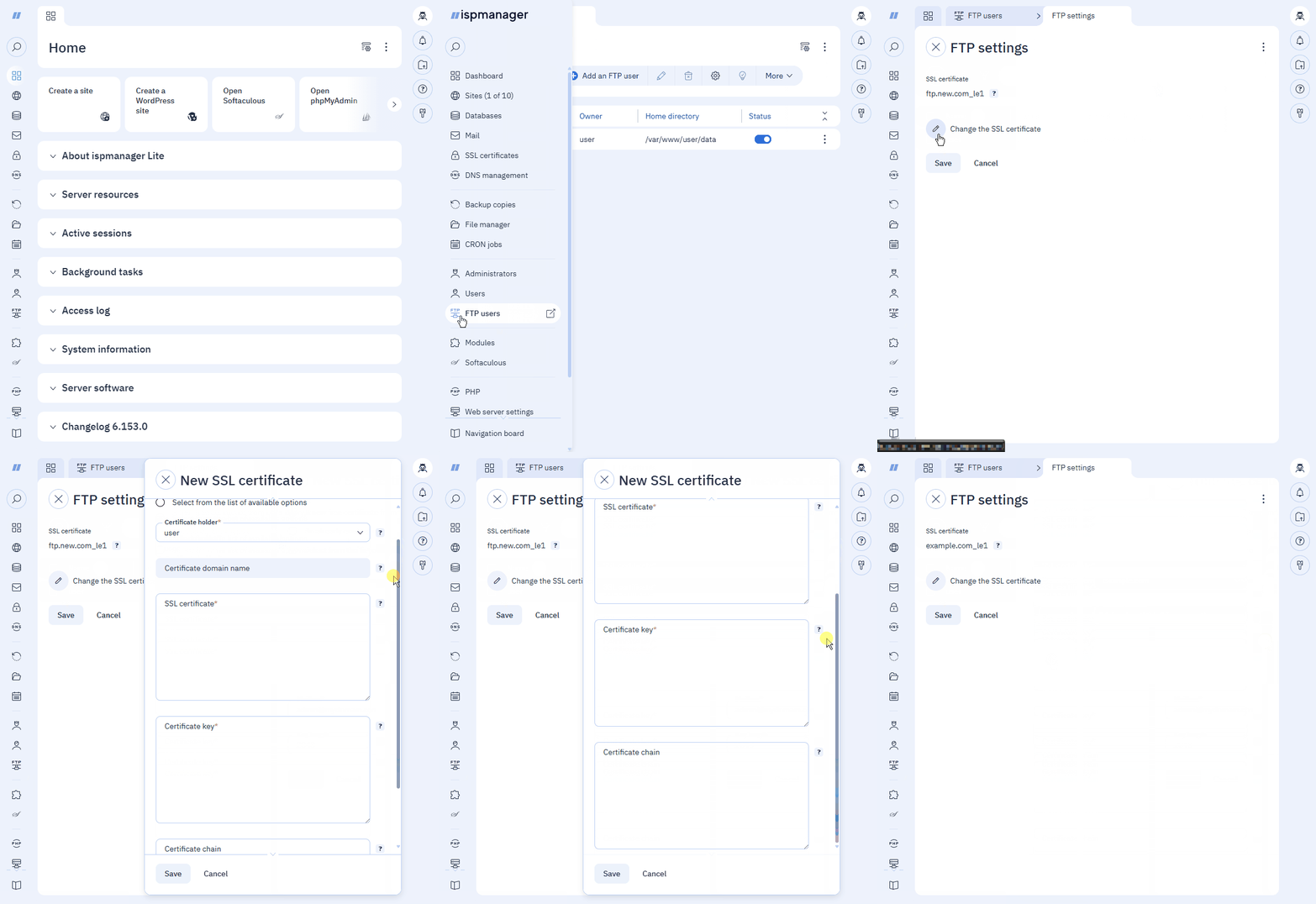
- Log in to the ispmanager panel with an administrator-level account or above.
- Go to the FTP users section.
- On the toolbar, click
 FTP settings.
 - Click Change the SSL certificate to replace the current certificate with a different one.
Select the certificate option and fill in the parameter fields.
The Let's Encrypt certificate will renew automatically every 90 days via ispmanager.
This option does not support the DNS validation and Wildcard certificates. If you need those, issue an SSL certificate manually in the SSL certificates section and install it on the server using the option Select from the list of available options.
- Certificate domain name — the domain name of the FTP server, for example ftp.example.com
- Certificate holder — the user account that will be used used to generate the certificate
- Mailbox — email of the certificate holder
- Key length — 2048 (default) or 4096 bit
Use this option to add a certificate from another external issuer.
- Certificate holder — the user account that will be used to generate the certificate
- SSL certificate — the certificate in the PEM format (.crt)
- Certificate key — the certificate key in the PEM format (.key)
- Certificate bundle — the certificate bundle in the PEM format (.ca-bundle)
Use this option to select an existing SSL certificate from the panel.
- Domain name — the domain that the certificate will be issued for
- SSL-certificate — the name of the certificate
- Click Save.
The FTP certificate is marked with the  icon and appears in the list in the SSL certificates section.
Deleting FTP certificate
The FTP SSL certificate can not be missing.
If you remove the current certificate from the list of SSL certificates or the user that owns it, ispmanager will replace it with the default self-signed FTP certificate.
If the site that uses the same certificate is deleted, the certificate will continue working and renewing for the FTP server.
FTP certificate files
All certificates added for the user are stored in the /var/www/httpd-cert/USER directory.